
Folger Tech Kossel Delta 2020 Full 3D Printer Kit w/Auto-Level
Posted by Kasahabo
|
Re: Folger Tech Kossel Delta 2020 Full 3D Printer Kit w/Auto-Level February 01, 2016 10:09AM |
Registered: 8 years ago Posts: 432 |
Quote
EvilBetty
I may have to do that, but the probe seems to be working fine. The problem is the probe is tilting in relation to the print head. I'd like to get that fixed first.
Good luck )) I still have some tilt but my prints are close to ideal. Especially after the probe mount I designed to get rid of offset : [www.thingiverse.com]
Yes. But you have to level your bed manually first to get it relatively flat. Than use this calculator to polish your values.
Edited 1 time(s). Last edit at 02/01/2016 10:10AM by paul_delta.
My [www.thingiverse.com] stuff, my configuration of Repetier 0.92.6: [forums.reprap.org] (use Arduino 1.6.5 to compile)
|
Re: Folger Tech Kossel Delta 2020 Full 3D Printer Kit w/Auto-Level February 01, 2016 10:25AM |
Registered: 8 years ago Posts: 63 |
Quote
paul_delta
Quote
EvilBetty
I may have to do that, but the probe seems to be working fine. The problem is the probe is tilting in relation to the print head. I'd like to get that fixed first.
Good luck )) I still have some tilt but my prints are close to ideal. Especially after the probe mount I designed to get rid of offset : [www.thingiverse.com]
Ha! I've seen that multiple times and have tried to print it, but CAN'T due to the this problem. I should have known it belonged to someone in this thread (never looked at the maker until now).
Quote
paul_delta
Yes. But you have to level your bed manually first to get it relatively flat. Than use this calculator to polish your values.
Ok I may attack that tonight. Thanks

So what process do you start with, to eliminate tilt from the platform?
|
Re: Folger Tech Kossel Delta 2020 Full 3D Printer Kit w/Auto-Level February 01, 2016 10:32AM |
Registered: 8 years ago Posts: 432 |
Quote
EvilBetty
So what process do you start with, to eliminate tilt from the platform?
If your rods are equal and parallel, the only reason why you still have a tilt - disproportional effector. Try to measure it in different X/Y/Z directions between similar fragments.
It's just my guess, but probably your effector was printed with uncalibrated printer where dimensions "float" depending on axis.
My [www.thingiverse.com] stuff, my configuration of Repetier 0.92.6: [forums.reprap.org] (use Arduino 1.6.5 to compile)
|
Re: Folger Tech Kossel Delta 2020 Full 3D Printer Kit w/Auto-Level February 01, 2016 11:27AM |
Registered: 8 years ago Posts: 63 |
Ok. I'll remeasure all of that again tonight. I also ordered the aluminum effector plate from Folger Tech last night.
Besides equal and parallel, is there concern with the rods being centered with each tower? Meaning each rod mounted to the carrier being an equal distance from the tower extrusion? If so I'm guessing this would require sandpaper and washers to fix either direction.
Besides equal and parallel, is there concern with the rods being centered with each tower? Meaning each rod mounted to the carrier being an equal distance from the tower extrusion? If so I'm guessing this would require sandpaper and washers to fix either direction.
|
Re: Folger Tech Kossel Delta 2020 Full 3D Printer Kit w/Auto-Level February 01, 2016 12:02PM |
Registered: 8 years ago Posts: 188 |
Quote
paul_delta
Quote
Captain_Tim
So when I get to the part of the video where I check and adjust the Horizontal Rod Radius, if the hot end doesn't reach the bed when Z is 0, do I add or subtract value from the Horizontal radius, or is it the Z max Height that I need to adjust?
First, adjust Z height and endstop offsets in eeprom to get correct Z0 near towers. Then adjust your Z height in eeprom again to get correct Z0 in the center of bed. Then play with horizontal radius to put near-tower points in level with the center of bed - decreasing the horizontal radius to rise side points or increasing to lower them. The starting point - to increase/decrease the horiz.radius to value of height you need to rise/lower side points multiplied by 2.2.
So, if I'm understanding you correctly, these are the steps I should take while calibrating:
1. Set Z Max Height correctly in EEPROM (Mine is 234.2mm)
2. Adjust the Tower endstop Offsets in the EEPROM so it's 0 at the tower
3. Center the hotend and re-adjust the Z Max Height in EEPROM so it now passes the paper test when Z0
4. Check the points near the Towers and adjust the Horizontal Radius so the hotend passes the paper test when Z0. Increase the Horizontal radius to lower the hotend, and decrease the horizontal radius to lift the hotend.
I don't understand the last part though, could you explain it a bit better, if you could?
Quote
paul_delta
The starting point - to increase/decrease the horiz.radius to value of height you need to rise/lower side points multiplied by 2.2.
Owner of a QUBD Two Up
And
Folger Kossel 2020
And
Tevo Tarantula
|
Re: Folger Tech Kossel Delta 2020 Full 3D Printer Kit w/Auto-Level February 01, 2016 12:55PM |
Registered: 8 years ago Posts: 432 |
Quote
Captain_Tim
4. Check the points near the Towers and adjust the Horizontal Radius so the hotend passes the paper test when Z0. Increase the Horizontal radius to lower the hotend, and decrease the horizontal radius to lift the hotend.
I don't understand the last part though, could you explain it a bit better, if you could?
Quote
paul_delta
The starting point - to increase/decrease the horiz.radius to value of height you need to rise/lower side points multiplied by 2.2.
No, there is nothing to do with hotend. After step 3, depending on horizontal radius value, you will get one of these situations:
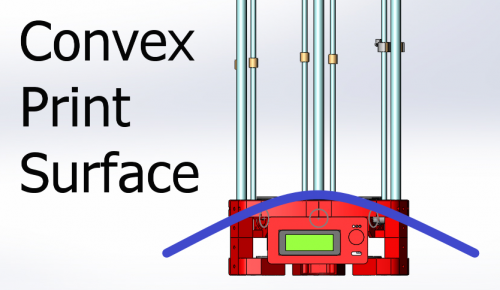
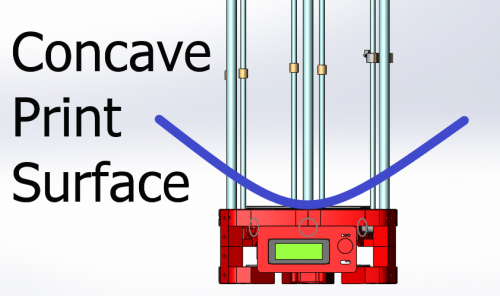
So, for convex you will need to decrease horizontal radius value to "lift" (virtually, software way) outside points or increase it for concave shape - to make everything flat.
My [www.thingiverse.com] stuff, my configuration of Repetier 0.92.6: [forums.reprap.org] (use Arduino 1.6.5 to compile)
|
Re: Folger Tech Kossel Delta 2020 Full 3D Printer Kit w/Auto-Level February 01, 2016 01:21PM |
Registered: 8 years ago Posts: 188 |
Ok, so after I re-adjust the Z height after I do the tower offsets, then I move towards the towers and I then adjust the horizontal radius based on whether or not my it's not touching the build plate at Z0 or not? And the adjustment value is the height difference * 2.2?
Owner of a QUBD Two Up
And
Folger Kossel 2020
And
Tevo Tarantula
Owner of a QUBD Two Up
And
Folger Kossel 2020
And
Tevo Tarantula
|
Re: Folger Tech Kossel Delta 2020 Full 3D Printer Kit w/Auto-Level February 01, 2016 01:37PM |
Registered: 8 years ago Posts: 432 |
Quote
Captain_Tim
Ok, so after I re-adjust the Z height after I do the tower offsets, then I move towards the towers and I then adjust the horizontal radius based on whether or not my it's not touching the build plate at Z0 or not? And the adjustment value is the height difference * 2.2?
Correct. It will take couple of iterations. Don't forget to check X0Y0Z0 and adjust Z height every time after changing hor. radius, before re-measuring of tower points.
Edited 1 time(s). Last edit at 02/01/2016 01:38PM by paul_delta.
My [www.thingiverse.com] stuff, my configuration of Repetier 0.92.6: [forums.reprap.org] (use Arduino 1.6.5 to compile)
|
Re: Folger Tech Kossel Delta 2020 Full 3D Printer Kit w/Auto-Level February 01, 2016 01:41PM |
Registered: 8 years ago Posts: 188 |
Ok, so set Z height, check towers, set Z height, check Horizontal Radius, repeat. Got it. Then after this calibration, I should, in theory be alright with using the above mentioned calculator to help calibrate it. Lots of work, but it'll be worth it.
Owner of a QUBD Two Up
And
Folger Kossel 2020
And
Tevo Tarantula
Owner of a QUBD Two Up
And
Folger Kossel 2020
And
Tevo Tarantula
|
Re: Folger Tech Kossel Delta 2020 Full 3D Printer Kit w/Auto-Level February 01, 2016 01:45PM |
Registered: 8 years ago Posts: 432 |
Quote
Captain_Tim
Ok, so set Z height, check towers, set Z height, check Horizontal Radius, repeat. Got it. Then after this calibration, I should, in theory be alright with using the above mentioned calculator to help calibrate it. Lots of work, but it'll be worth it.
I think you may try to use calculator after first hor. radius correction.
My [www.thingiverse.com] stuff, my configuration of Repetier 0.92.6: [forums.reprap.org] (use Arduino 1.6.5 to compile)
|
Re: Folger Tech Kossel Delta 2020 Full 3D Printer Kit w/Auto-Level February 01, 2016 01:46PM |
Registered: 8 years ago Posts: 188 |
Quote
paul_delta
Quote
Captain_Tim
Ok, so set Z height, check towers, set Z height, check Horizontal Radius, repeat. Got it. Then after this calibration, I should, in theory be alright with using the above mentioned calculator to help calibrate it. Lots of work, but it'll be worth it.
I think you may try to use calculator after first hor. radius correction.
Will do. I can't print till I get a new push fit connector anyways. At least it's shipped already, so I only have to wait 5-10 days.
Owner of a QUBD Two Up
And
Folger Kossel 2020
And
Tevo Tarantula
|
Re: Folger Tech Kossel Delta 2020 Full 3D Printer Kit w/Auto-Level February 01, 2016 02:57PM |
Registered: 8 years ago Posts: 98 |
Quote
paul_delta
Quote
EvilBetty
I may have to do that, but the probe seems to be working fine. The problem is the probe is tilting in relation to the print head. I'd like to get that fixed first.
Good luck )) I still have some tilt but my prints are close to ideal. Especially after the probe mount I designed to get rid of offset : [www.thingiverse.com]
I tried out your probe and got great results by reducing my bed height in the EEPROM by 70mm to account for the probe height.. The problem was that it did not recognize the Z correction when fixed the Z height after dismounting the probe and refused to home. I tried a lot of settings trying to accept the probe "in place" with the correct Z height, but it kept slamming into the bed with G32 (G30 homed correctly though and accounted for the distance).
Any advice on firmware settings? I'm using the latest Repetier version (0.92.8 I think)
|
Re: Folger Tech Kossel Delta 2020 Full 3D Printer Kit w/Auto-Level February 01, 2016 03:29PM |
Registered: 8 years ago Posts: 432 |
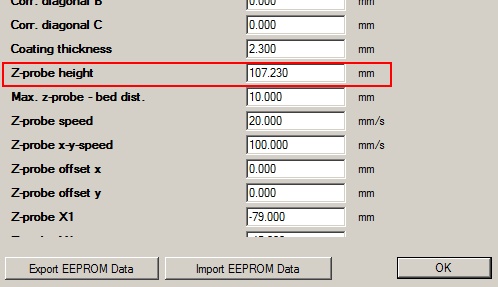
No, this is wrong way. You have to set z-probe height in Eeprom just once. Firmware will do all height calculation automatically - only during z-probe procedures.
I'm going to test 92.8 version soon and check how the updated bed leveling procedure works.
My [www.thingiverse.com] stuff, my configuration of Repetier 0.92.6: [forums.reprap.org] (use Arduino 1.6.5 to compile)
I'm going to test 92.8 version soon and check how the updated bed leveling procedure works.
Quote
spiffcow
Quote
paul_delta
Quote
EvilBetty
I may have to do that, but the probe seems to be working fine. The problem is the probe is tilting in relation to the print head. I'd like to get that fixed first.
Good luck )) I still have some tilt but my prints are close to ideal. Especially after the probe mount I designed to get rid of offset : [www.thingiverse.com]
I tried out your probe and got great results by reducing my bed height in the EEPROM by 70mm to account for the probe height.. The problem was that it did not recognize the Z correction when fixed the Z height after dismounting the probe and refused to home. I tried a lot of settings trying to accept the probe "in place" with the correct Z height, but it kept slamming into the bed with G32 (G30 homed correctly though and accounted for the distance).
Any advice on firmware settings? I'm using the latest Repetier version (0.92.8 I think)
My [www.thingiverse.com] stuff, my configuration of Repetier 0.92.6: [forums.reprap.org] (use Arduino 1.6.5 to compile)
|
Re: Folger Tech Kossel Delta 2020 Full 3D Printer Kit w/Auto-Level February 01, 2016 03:31PM |
Registered: 8 years ago Posts: 432 |
... here is the screenshot:
My [www.thingiverse.com] stuff, my configuration of Repetier 0.92.6: [forums.reprap.org] (use Arduino 1.6.5 to compile)
My [www.thingiverse.com] stuff, my configuration of Repetier 0.92.6: [forums.reprap.org] (use Arduino 1.6.5 to compile)
|
Re: Folger Tech Kossel Delta 2020 Full 3D Printer Kit w/Auto-Level February 01, 2016 05:10PM |
Registered: 8 years ago Posts: 98 |
Quote
paul_delta
No, this is wrong way. You have to set z-probe height in Eeprom just once. Firmware will do all height calculation automatically - only during z-probe procedures.
I'm going to test 92.8 version soon and check how the updated bed leveling procedure works.
That's what I tried at first, but it seems that the bed height isn't being honored by the G32 command, but it is for the G30 command. Heh, looks like maybe I have some firmware hacking to do.
I'm getting the same tilt issues as EvilBetty, and my carriages are a much different width apart than the effector..
I did manage to print a new effector. I think I may switch to it tonight and see if that improves things. My errors are pretty small near the center, so it might be close enough to accurate...
|
Re: Folger Tech Kossel Delta 2020 Full 3D Printer Kit w/Auto-Level February 01, 2016 05:15PM |
Registered: 8 years ago Posts: 432 |
Quote
spiffcow
That's what I tried at first, but it seems that the bed height isn't being honored by the G32 command, but it is for the G30 command. Heh, looks like maybe I have some firmware hacking to do.
Probably it's a bug. I'll test it, if so - will report to Repetier forum.
My [www.thingiverse.com] stuff, my configuration of Repetier 0.92.6: [forums.reprap.org] (use Arduino 1.6.5 to compile)
|
Re: Folger Tech Kossel Delta 2020 Full 3D Printer Kit w/Auto-Level February 01, 2016 05:18PM |
Registered: 8 years ago Posts: 432 |
I've just tested it with 0.92.6 - G28 and then G32 works OK and it takes care about my z-probe height.
I'll check it later with 92.8.
Edited 1 time(s). Last edit at 02/01/2016 05:20PM by paul_delta.
My [www.thingiverse.com] stuff, my configuration of Repetier 0.92.6: [forums.reprap.org] (use Arduino 1.6.5 to compile)
I'll check it later with 92.8.
Edited 1 time(s). Last edit at 02/01/2016 05:20PM by paul_delta.
My [www.thingiverse.com] stuff, my configuration of Repetier 0.92.6: [forums.reprap.org] (use Arduino 1.6.5 to compile)
|
Re: Folger Tech Kossel Delta 2020 Full 3D Printer Kit w/Auto-Level February 01, 2016 05:25PM |
Registered: 8 years ago Posts: 98 |
|
Re: Folger Tech Kossel Delta 2020 Full 3D Printer Kit w/Auto-Level February 01, 2016 05:27PM |
Registered: 8 years ago Posts: 432 |
You can play with my configuration if you want, here is an archive of my 0.92.6: [forums.reprap.org]
My [www.thingiverse.com] stuff, my configuration of Repetier 0.92.6: [forums.reprap.org] (use Arduino 1.6.5 to compile)
Quote
spiffcow
Thanks, please let me know what you find! I didn't see a download location for 0.92.6, but I'll look a little harder when I get home.
My [www.thingiverse.com] stuff, my configuration of Repetier 0.92.6: [forums.reprap.org] (use Arduino 1.6.5 to compile)
|
Re: Folger Tech Kossel Delta 2020 Full 3D Printer Kit w/Auto-Level February 01, 2016 05:37PM |
Registered: 8 years ago Posts: 98 |
Quote
paul_delta
You can play with my configuration if you want, here is an archive of my 0.92.6: [forums.reprap.org]
Thanks! Taking a look at it now..
Are your rods really 230mm? I built to instructions and came out with 240mm rods, and had concavity problems until I increased the firmware value to something around 260/160 for my rod length/bed radius. I *still* have concavity problems with that setup at the outer 15mm..
|
Re: Folger Tech Kossel Delta 2020 Full 3D Printer Kit w/Auto-Level February 01, 2016 05:44PM |
Registered: 8 years ago Posts: 432 |
Quote
spiffcow
Are your rods really 230mm? I built to instructions and came out with 240mm rods, and had concavity problems until I increased the firmware value to something around 260/160 for my rod length/bed radius. I *still* have concavity problems with that setup at the outer 15mm..
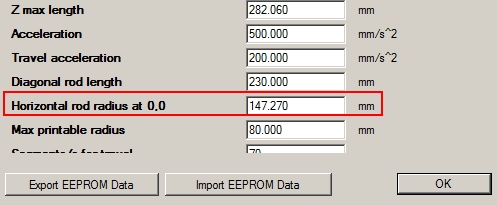
Yes, 230mm. Earlier versions of manual recommended 230mm. Actually, It's too short - the printable diameter is only 158mm.
To fight concavity you have to adjust horizontal rod radius, not the bed radius. Set your real diagonal rod lenght, and play with horizontal rod radius. Here is the screenshot:
My [www.thingiverse.com] stuff, my configuration of Repetier 0.92.6: [forums.reprap.org] (use Arduino 1.6.5 to compile)
|
Re: Folger Tech Kossel Delta 2020 Full 3D Printer Kit w/Auto-Level February 01, 2016 05:53PM |
Registered: 8 years ago Posts: 98 |
Quote
paul_delta
Quote
spiffcow
Are your rods really 230mm? I built to instructions and came out with 240mm rods, and had concavity problems until I increased the firmware value to something around 260/160 for my rod length/bed radius. I *still* have concavity problems with that setup at the outer 15mm..
Yes, 230mm. Earlier versions of manual recommended 230mm. Actually, It's too short - the printable diameter is only 158mm.
To fight concavity you have to adjust horizontal rod radius, not the bed radius. Set your real diagonal rod lenght, and play with horizontal rod radius. Here is the screenshot:
[attachment 71449 horizontal-rod-eeprom.jpg]
I tried that, but I get an "Invalid Delta Move" exception when the rod length setting in the firmware isn't increased to compensate.. I'm wondering if they're not taking into account the effector width. I used Repetier's configuration tool to set it up initially.
Also, I apologize, I meant rod radius earlier. I know bed radius isn't a factor in this (although possibly related to the invalid delta move problem?)
Edited 1 time(s). Last edit at 02/01/2016 05:57PM by spiffcow.
|
Re: Folger Tech Kossel Delta 2020 Full 3D Printer Kit w/Auto-Level February 01, 2016 05:58PM |
Registered: 8 years ago Posts: 432 |
It's just a matter of wrong values in configuration file. You will have these errors when the effector will try to move out of boundaries area.
My [www.thingiverse.com] stuff, my configuration of Repetier 0.92.6: [forums.reprap.org] (use Arduino 1.6.5 to compile)
Quote
spiffcow
Quote
paul_delta
Quote
spiffcow
Are your rods really 230mm? I built to instructions and came out with 240mm rods, and had concavity problems until I increased the firmware value to something around 260/160 for my rod length/bed radius. I *still* have concavity problems with that setup at the outer 15mm..
Yes, 230mm. Earlier versions of manual recommended 230mm. Actually, It's too short - the printable diameter is only 158mm.
To fight concavity you have to adjust horizontal rod radius, not the bed radius. Set your real diagonal rod lenght, and play with horizontal rod radius. Here is the screenshot:
[attachment 71449 horizontal-rod-eeprom.jpg]
I tried that, but I get an "Invalid Delta Move" exception when the rod length setting in the firmware isn't increased to compensate.. I'm wondering if they're not taking into account the effector width. I used Repetier's configuration tool to set it up initially.
My [www.thingiverse.com] stuff, my configuration of Repetier 0.92.6: [forums.reprap.org] (use Arduino 1.6.5 to compile)
|
Re: Folger Tech Kossel Delta 2020 Full 3D Printer Kit w/Auto-Level February 01, 2016 06:20PM |
Registered: 8 years ago Posts: 432 |
Quote
spiffcow
Also, I apologize, I meant rod radius earlier. I know bed radius isn't a factor in this (although possibly related to the invalid delta move problem?)
Yes, increase your bed radius and try again. Set something like real bed radius + 5.
Edited 1 time(s). Last edit at 02/01/2016 06:21PM by paul_delta.
My [www.thingiverse.com] stuff, my configuration of Repetier 0.92.6: [forums.reprap.org] (use Arduino 1.6.5 to compile)
|
Re: Folger Tech Kossel Delta 2020 Full 3D Printer Kit w/Auto-Level February 01, 2016 06:36PM |
Registered: 8 years ago Posts: 188 |
|
Re: Folger Tech Kossel Delta 2020 Full 3D Printer Kit w/Auto-Level February 01, 2016 06:45PM |
Registered: 8 years ago Posts: 432 |
Quote
Captain_Tim
When I move my effector to say X5 Y80 Z5 to check the Z tower, and lower the effector closer to the bed, it seems to jerk/slip as it lowers. What causes this and how can I fix this?
Did you check vRef voltage for drivers that serve XYZ motors? Also high acceleration/speed could be the reason.
My [www.thingiverse.com] stuff, my configuration of Repetier 0.92.6: [forums.reprap.org] (use Arduino 1.6.5 to compile)
|
Re: Folger Tech Kossel Delta 2020 Full 3D Printer Kit w/Auto-Level February 01, 2016 06:56PM |
Registered: 8 years ago Posts: 188 |
vRef is all good, and acceleration is only 100mm. Could it have to do with the arms? As it only happens on at the Z tower, when I'm testing the tower point. It would also appear that when the effector is at X0 Y0, it's not centered and is 6mm closer to the Z Tower.
Owner of a QUBD Two Up
And
Folger Kossel 2020
And
Tevo Tarantula
Owner of a QUBD Two Up
And
Folger Kossel 2020
And
Tevo Tarantula
|
Re: Folger Tech Kossel Delta 2020 Full 3D Printer Kit w/Auto-Level February 01, 2016 07:03PM |
Registered: 8 years ago Posts: 432 |
Quote
Captain_Tim
vRef is all good, and acceleration is only 100mm. Could it have to do with the arms? As it only happens on at the Z tower, when I'm testing the tower point. It would also appear that when the effector is at X0 Y0, it's not centered and is 6mm closer to the Z Tower.
May be your bed is off-center. Did you perform G131,G132 to get the real center before calibration?
Edited 1 time(s). Last edit at 02/01/2016 07:04PM by paul_delta.
My [www.thingiverse.com] stuff, my configuration of Repetier 0.92.6: [forums.reprap.org] (use Arduino 1.6.5 to compile)
|
Re: Folger Tech Kossel Delta 2020 Full 3D Printer Kit w/Auto-Level February 01, 2016 07:05PM |
Registered: 8 years ago Posts: 188 |
Quote
paul_delta
Quote
Captain_Tim
vRef is all good, and acceleration is only 100mm. Could it have to do with the arms? As it only happens on at the Z tower, when I'm testing the tower point. It would also appear that when the effector is at X0 Y0, it's not centered and is 6mm closer to the Z Tower.
May be your bed is off-center. Did you perform G131,G132 to get the real center before calibration?
I did not do that. I was unaware I needed to. Will do that now
Owner of a QUBD Two Up
And
Folger Kossel 2020
And
Tevo Tarantula
|
Re: Folger Tech Kossel Delta 2020 Full 3D Printer Kit w/Auto-Level February 01, 2016 07:08PM |
Registered: 8 years ago Posts: 432 |
Quote
Captain_Tim
As it only happens on at the Z tower, when I'm testing the tower point.
So, X or Y motor looses steps at extreme position. Try to rise the vRef for them. I have no experience with long diagonal rods, probably stock motors are too weak in this case...
My [www.thingiverse.com] stuff, my configuration of Repetier 0.92.6: [forums.reprap.org] (use Arduino 1.6.5 to compile)


Sorry, only registered users may post in this forum.