
SinapTec AT328.02 is a 3D FDM printer controller board of ultra low cost, Based on Arduino Nano
Posted by tatubias
|
SinapTec AT328.02 is a 3D FDM printer controller board of ultra low cost, Based on Arduino Nano May 23, 2015 02:29PM |
Registered: 9 years ago Posts: 792 |
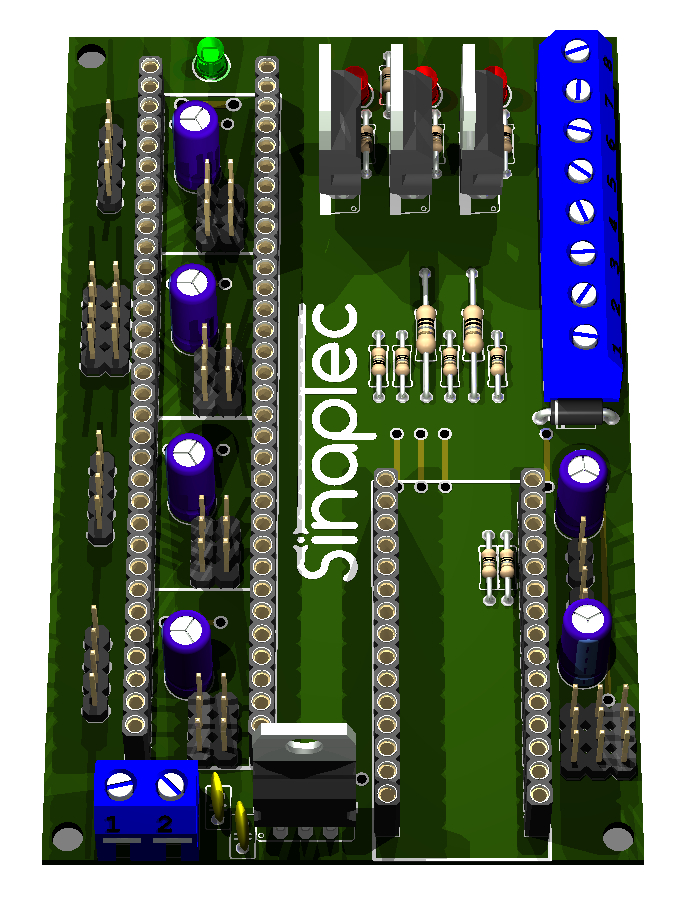
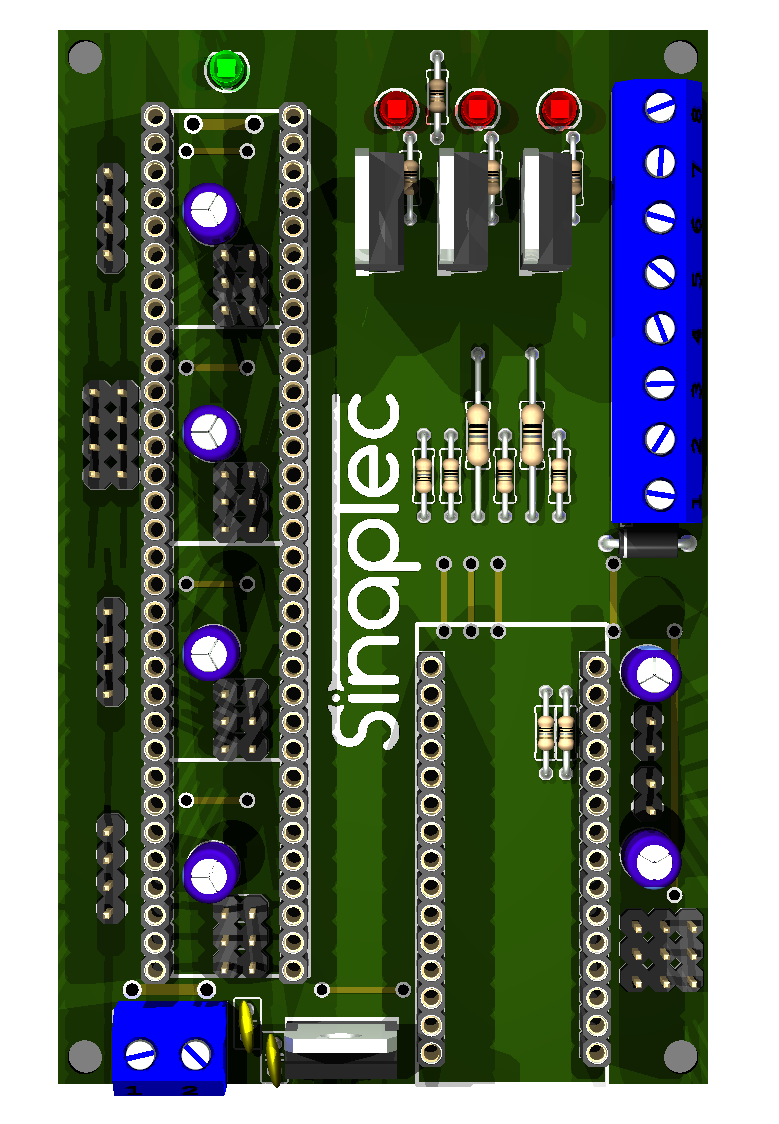
SinapTec AT328.02 is a 3D FDM printer controller board of very low cost, its operation is based on an Arduino Nano running a version of Teacup_Firmware. The board layout is designed so that it can be manufactured by any hobbyist, it is a simple face plate with through-hole components.
Summary:
Please check the wiki Site There you will be able to download :

Summary:
    1 Arduino Nano socket.

    4 Pololus sockets (X,Y,Z y E)

    3 Line in for X_MIN, Y_MIN and Z_MIN endstops.

    2 Line in for Hotend and heated bed sensors.

    3 Mosfets outputs for Heater, Fan and Bed (this last with independent power supply).
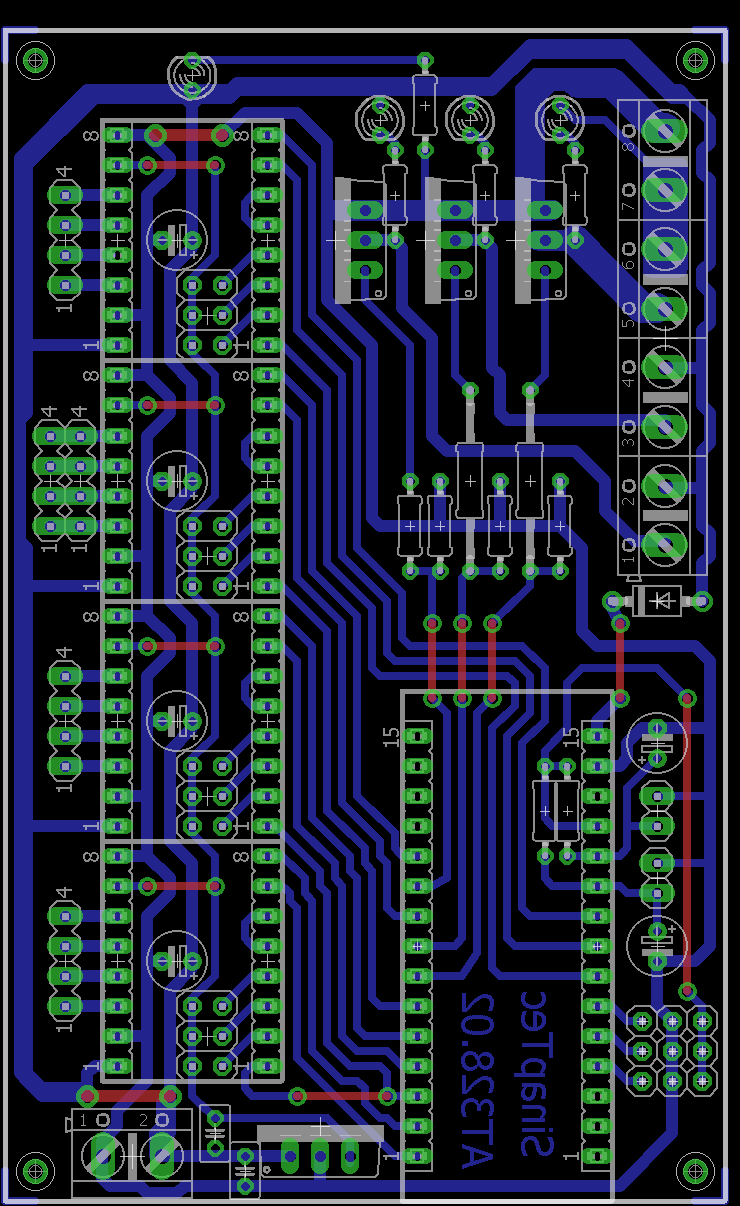
Please check the wiki Site There you will be able to download :
- * Tonner transfer file
* Firmware TeaCup_-_CoreXY
* PBC (Eagle)
* PCB diagram for transfer toner
* Gcode for drilling CNC
* Gcode for PCB CNC Milling
* Bill Of Materials
* Stepper drivers information
* Best Practices
* Languages in Spanish and English
* Electronics schematics
* Much more.
WIKI SITE: [www.reprap.org]
DEVELOPMENT THREAD: [forums.reprap.org]
Thinkgs to be needed to do:
- * Make the configuration file and push it to the experimental branch of tea cup.
* We are developing some Voronoi PCB
* Put more information on the wiki
* Add more photograph of the board
* More Stuff
|
Re: SinapTec AT328.02 is a 3D FDM printer controller board of ultra low cost, Based on Arduino Nano May 23, 2015 02:46PM |
Registered: 9 years ago Posts: 590 |
|
Re: SinapTec AT328.02 is a 3D FDM printer controller board of ultra low cost, Based on Arduino Nano May 24, 2015 01:51PM |
Registered: 9 years ago Posts: 792 |
|
Re: SinapTec AT328.02 is a 3D FDM printer controller board of ultra low cost, Based on Arduino Nano May 24, 2015 05:25PM |
Registered: 8 years ago Posts: 26 |
Hi,
That is a great idea but why the arduino nano ?
A Maple mini from LeafLabs will not cost much more than a nano, has a similar form factor but enough power to drive any printer even a delta with new 1/128 microstepping stepper motor drivers.
(to be honest, I dream about such a card for a maple mini )
)
Laurent
That is a great idea but why the arduino nano ?
A Maple mini from LeafLabs will not cost much more than a nano, has a similar form factor but enough power to drive any printer even a delta with new 1/128 microstepping stepper motor drivers.
(to be honest, I dream about such a card for a maple mini
)Laurent
|
Re: SinapTec AT328.02 is a 3D FDM printer controller board of ultra low cost, Based on Arduino Nano May 24, 2015 10:26PM |
Registered: 9 years ago Posts: 978 |
I suspect the answer is that the Nano is an Atmel 8-bit CPU, for which there's lots of code and knowledge regarding 3D printing, whereas the Maple mini is an ARM, which everyone is lusting after but no-one has got working well yet.
And it appears that the Maple mini has been discontinued??? https://www.sparkfun.com/products/retired/11280
Arduino Zero?
Edited 1 time(s). Last edit at 05/24/2015 10:30PM by frankvdh.
And it appears that the Maple mini has been discontinued??? https://www.sparkfun.com/products/retired/11280
Arduino Zero?
Edited 1 time(s). Last edit at 05/24/2015 10:30PM by frankvdh.
|
Re: SinapTec AT328.02 is a 3D FDM printer controller board of ultra low cost, Based on Arduino Nano May 25, 2015 02:04AM |
Registered: 9 years ago Posts: 792 |
@frankvdh basically you are correct.
But the main issue is that we are form Argentina and its complicated for us to get electronics. as a reference an arduino nano Chinese version cost like 22 USD. forget to get a maple board.
Arduino zero it not available on out country yet. but imagine if a nano cost 22 usd what will a zero will cost.
@Laurent04FR we were not aware of that board and we dont get it here.Also the amount of code , cost , and knowledge related to arduino was the best option for us. It looks like the teacup firmware does not support it either.
Edited 3 time(s). Last edit at 05/25/2015 02:30AM by tatubias.
But the main issue is that we are form Argentina and its complicated for us to get electronics. as a reference an arduino nano Chinese version cost like 22 USD. forget to get a maple board.
Arduino zero it not available on out country yet. but imagine if a nano cost 22 usd what will a zero will cost.
@Laurent04FR we were not aware of that board and we dont get it here.Also the amount of code , cost , and knowledge related to arduino was the best option for us. It looks like the teacup firmware does not support it either.
Edited 3 time(s). Last edit at 05/25/2015 02:30AM by tatubias.
|
Re: SinapTec AT328.02 is a 3D FDM printer controller board of ultra low cost, Based on Arduino Nano May 25, 2015 02:04PM |
Registered: 8 years ago Posts: 26 |
|
Re: SinapTec AT328.02 is a 3D FDM printer controller board of ultra low cost, Based on Arduino Nano May 25, 2015 06:08PM |
Registered: 13 years ago Posts: 7,616 |
Yupp, good idea!
High current tracks like 12/24V for the steppers and corresponding GND are a bit thin for my taste. Here's a track width calculator: [www.circuitcalculator.com]
Would you mind to fully integrate this into official Teacup? I've seen you dropped a config.h, but unfortunately the use of this file in this way is deprecated already in favour of Configtool. With full integration we can both take advantage of each other, you get our work and we get yours.
High current tracks like 12/24V for the steppers and corresponding GND are a bit thin for my taste. Here's a track width calculator: [www.circuitcalculator.com]
Quote
tatubias
Please check the wiki Site There you will be able to download :
...
* Firmware TeaCup_-_CoreXY
...
Would you mind to fully integrate this into official Teacup? I've seen you dropped a config.h, but unfortunately the use of this file in this way is deprecated already in favour of Configtool. With full integration we can both take advantage of each other, you get our work and we get yours.
| Generation 7 Electronics | Teacup Firmware | RepRap DIY |
|
Re: SinapTec AT328.02 is a 3D FDM printer controller board of ultra low cost, Based on Arduino Nano May 25, 2015 06:44PM |
Registered: 9 years ago Posts: 792 |
Yes its my idea to develop the config for the new version of teacup . the issue was that I did try to run the tool py under windows an I got error so I need to install lunix in a VM an do the test.
I have already generated a config board file but i was no able to test it whit the experimental firmware yet.
I'm not a developer and gitbhub is chineaae for me lolol
I have already generated a config board file but i was no able to test it whit the experimental firmware yet.
I'm not a developer and gitbhub is chineaae for me lolol
Quote
Traumflug
Yupp, good idea!
High current tracks like 12/24V for the steppers and corresponding GND are a bit thin for my taste. Here's a track width calculator: [www.circuitcalculator.com]
Quote
tatubias
Please check the wiki Site There you will be able to download :
...
* Firmware TeaCup_-_CoreXY
...
Would you mind to fully integrate this into official Teacup? I've seen you dropped a config.h, but unfortunately the use of this file in this way is deprecated already in favour of Configtool. With full integration we can both take advantage of each other, you get our work and we get yours.
|
Re: SinapTec AT328.02 is a 3D FDM printer controller board of ultra low cost, Based on Arduino Nano May 26, 2015 06:24AM |
Registered: 13 years ago Posts: 7,616 |
Quote
tatubias
Yes its my idea to develop the config for the new version of teacup . the issue was that I did try to run the tool py under windows an I got error so I need to install lunix in a VM an do the test.
Thanks for the report. Configtool should definitely work under Windows (and Mac OS X). Prerequisites are about the same as those of Pronterface.
Could you copy the error message (or whatever happened)? Thanks.
| Generation 7 Electronics | Teacup Firmware | RepRap DIY |
|
Re: SinapTec AT328.02 is a 3D FDM printer controller board of ultra low cost, Based on Arduino Nano May 26, 2015 04:14PM |
Registered: 9 years ago Posts: 792 |
Quote
Traumflug
Quote
tatubias
Yes its my idea to develop the config for the new version of teacup . the issue was that I did try to run the tool py under windows an I got error so I need to install lunix in a VM an do the test.
Thanks for the report. Configtool should definitely work under Windows (and Mac OS X). Prerequisites are about the same as those of Pronterface.
Could you copy the error message (or whatever happened)? Thanks.
C:\Users\xxxxxx\Downloads\Teacup_Firmware-experimental>C:\Users\xxxxxx\Downloads\Teacup_Firmware-experimental\configtool.py
Traceback (most recent call last):
File "C:\Users\xxxxxx\Downloads\Teacup_Firmware-experimental\configtool.py",
line 3, in
import wx
ImportError: No module named wx
C:\Users\xxxxxx\Downloads\Teacup_Firmware-experimental>
Edited 1 time(s). Last edit at 05/26/2015 04:25PM by tatubias.
|
Re: SinapTec AT328.02 is a 3D FDM printer controller board of ultra low cost, Based on Arduino Nano May 26, 2015 07:44PM |
Registered: 13 years ago Posts: 7,616 |
Quote
tatubias
ImportError: No module named wx
Thanks. You need to install wxPython, the version matching your other Python installation: [wxpython.org]
| Generation 7 Electronics | Teacup Firmware | RepRap DIY |
|
Re: SinapTec AT328.02 is a 3D FDM printer controller board of ultra low cost, Based on Arduino Nano May 27, 2015 09:01AM |
Registered: 13 years ago Posts: 7,616 |
Another thing is, your Python might default to Python3, which can't be supported, because there's no wxPython for Python3. Typing "python2 configtool.py" should help.
And thanks to your error report we managed to add two commits giving better hints: [github.com]
And thanks to your error report we managed to add two commits giving better hints: [github.com]
| Generation 7 Electronics | Teacup Firmware | RepRap DIY |
|
Re: SinapTec AT328.02 is a 3D FDM printer controller board of ultra low cost, Based on Arduino Nano May 28, 2015 01:37PM |
Registered: 9 years ago Posts: 792 |
Quote
Traumflug
Another thing is, your Python might default to Python3, which can't be supported, because there's no wxPython for Python3. Typing "python2 configtool.py" should help.
And thanks to your error report we managed to add two commits giving better hints: [github.com]
You were right.
 i did install wxPython and did work perfect.
 this is the new board file. i have noticed some errors that should not be pointing me it may be some typo in the cfg file.
/***************************************************************************\
*                                                                           *
* 1. CPU                                                                    *
*                                                                           *
\***************************************************************************/

/** \def CPU_TYPE
  CPU types a user should be able to choose from in configtool. All
  commented out.
*/
//#define CPU_TYPE ATmega328

/** \def CPU
  CPU actually present on the board.
*/
#define CPU                      atmega328

/** \def F_CPU_OPT
  CPU clock frequencies a user should be able to choose from in configtool.
  All commented out.
*/
//#define F_CPU_OPT 16000000UL

/** \def F_CPU
  Actual CPU clock rate. #ifndef required for Arduino compatibility.
*/
#ifndef F_CPU
#define F_CPU                    16000000UL
#endif

/** \def MOTHERBOARD
  This is the motherboard, as opposed to the extruder. See extruder/ directory
  for GEN3 extruder firmware.
*/
#define MOTHERBOARD


/***************************************************************************\
*                                                                           *
* 2. PINOUTS                                                                *
*                                                                           *
\***************************************************************************/

#include "../arduino.h"

#define	X_STEP_PIN						DIO12
#define	X_DIR_PIN						DIO11
#define	X_MIN_PIN						AIO0
//#define	X_MAX_PIN					xxxx
#define	X_ENABLE_PIN					DIO10
#define	X_INVERT_DIR
#define	X_INVERT_MIN
//#define	X_INVERT_MAX				xxxx
#define	X_INVERT_ENABLE

#define	Y_STEP_PIN						DIO9
#define	Y_DIR_PIN						DIO8
#define	Y_MIN_PIN						AIO1
//#define	Y_MAX_PIN					xxxx
#define	Y_ENABLE_PIN					DIO10
#define	Y_INVERT_DIR
#define	Y_INVERT_MIN
//#define	Y_INVERT_MAX				xxxx
#define	Y_INVERT_ENABLE

#define	Z_STEP_PIN						DIO4
#define	Z_DIR_PIN						DIO2
#define	Z_MIN_PIN						AIO2
//#define	Z_MAX_PIN					xxxx
#define	Z_ENABLE_PIN					DIO7
#define	Z_INVERT_DIR
#define	Z_INVERT_MIN
//#define	Z_INVERT_MAX				xxxx
#define	Z_INVERT_ENABLE

#define	E_STEP_PIN						AIO4
#define	E_DIR_PIN						AIO5
#define E_ENABLE_PIN					AIO3
//#define	E_INVERT_DIR				xxxx
#define	E_INVERT_ENABLE

//#define	PS_ON_PIN					DIO9
//#define PS_MOSFET_PIN         		xxxx
//#define	STEPPER_ENABLE_PIN			DIO8
//#define	STEPPER_INVERT_ENABLE		xxxx

/** \def DEBUG_LED_PIN

  Enable flashing of a LED during motor stepping.

  Disabled by default. Uncommenting this makes the binary a few bytes larger
  and adds a few cycles to the step timing interrrupt in timer.c. Also used
  for precision profiling (profiling works even without actually having such
  a LED in hardware), see
  [reprap.org]
*/
//#define DEBUG_LED_PIN            DIO13


/***************************************************************************\
*                                                                           *
* 3. TEMPERATURE SENSORS                                                    *
*                                                                           *
\***************************************************************************/

#ifndef DEFINE_TEMP_SENSOR
  #define DEFINE_TEMP_SENSOR(...)
#endif

/** \def TEMP_MAX6675 TEMP_THERMISTOR TEMP_AD595 TEMP_PT100 TEMP_INTERCOM
  Which temperature sensor types are you using? Leave all used ones
  uncommented, comment out all others to save binary size and enhance
  performance.
*/
//#define TEMP_MAX6675
#define TEMP_THERMISTOR
//#define TEMP_AD595
//#define TEMP_PT100
//#define TEMP_INTERCOM

/** \def TEMP_SENSOR_PIN
  Temperature sensor pins a user should be able to choose from in configtool.
  All commented out.
*/
//#define TEMP_SENSOR_PIN AIO0
//#define TEMP_SENSOR_PIN AIO1

/** \def DEFINE_TEMP_SENSOR
  Define your temperature sensors here. One line for each sensor, only
  limited by the number of available ATmega pins.

  Name must match the name of the corresponding heater. If a heater "extruder"
  exists, a temperature sensor of that name has to exist as well. Same for
  heater "bed". There can be one sensor without corresponding heater, name it
  "noheater".

  Types are same as TEMP_ list above - TT_MAX6675, TT_THERMISTOR, TT_AD595,
  TT_PT100, TT_INTERCOM. See list in temp.c.

  The "additional" field is used for TT_THERMISTOR only. It defines the
  name of the table(s) in thermistortable.h to use. This name is arbitrary,
  often used names include THERMISTOR_EXTRUDER and THERMISTOR_BED. Also,
  several sensors can share the same table, which saves binary size.

  For a GEN3 set temp_type to TT_INTERCOM and temp_pin to AIO0. The pin
  won't be used in this case.
*/
//DEFINE_TEMP_SENSORS_START
//                 name      type           pin    additional
DEFINE_TEMP_SENSOR(extruder, TT_THERMISTOR, AIO7,  THERMISTOR_EXTRUDER)
DEFINE_TEMP_SENSOR(bed,      TT_THERMISTOR, AIO6,  THERMISTOR_BED)

//                     r0      beta  r2    vadc
//TEMP_TABLE EXTRUDER (100000, 4092, 4700, 5.0)
//TEMP_TABLE BED      (100000, 4092, 4700, 5.0)
//DEFINE_TEMP_SENSORS_END


/***************************************************************************\
*                                                                           *
* 4. HEATERS                                                                *
*                                                                           *
\***************************************************************************/

#ifndef DEFINE_HEATER
  #define DEFINE_HEATER(...)
#endif

/** \def HEATER_PIN
  Heater pins a user should be able to choose from in configtool. All
  commented out.
*/
//#define HEATER_PIN DIO8
//#define HEATER_PIN DIO9
//#define HEATER_PIN DIO10

/** \def DEFINE_HEATER
  Define your heaters and devices here.

  To attach a heater to a temp sensor above, simply use exactly the same
  name - copy+paste is your friend. Some common names are 'extruder',
  'bed', 'fan', 'motor', ... names with special meaning can be found
  in gcode_process.c. Currently, these are:
    HEATER_extruder   (M104)
    HEATER_bed        (M140)
    HEATER_fan        (M106)

  Devices don't neccessarily have a temperature sensor, e.g. fans or
  milling spindles. Operate such devices by setting their power (M106),
  instead of setting their temperature (M104).

  Also note, the index of a heater (M106 P#) can differ from the index of
  its attached temperature sensor (M104 P#) in case sensor-less devices
  are defined or the order of the definitions differs. The first defined
  device has the index 0 (zero).

  Set 'pwm' to ...
    1  for using PWM on a PWM-able pin and on/off on other pins.
    0  for using on/off on a PWM-able pin, too.

  Using PWM usually gives smoother temperature control but can conflict
  with slow switches, like solid state relays. PWM frequency can be
  influenced globally with FAST_PWM, see below.
*/
//DEFINE_HEATERS_START
//            name      port   pwm
DEFINE_HEATER(extruder, PD3,  1)
DEFINE_HEATER(bed,      PD6,  1)
DEFINE_HEATER(fan,      PD5,  1)

#define HEATER_EXTRUDER HEATER_extruder
#define HEATER_BED HEATER_bed
#define HEATER_FAN HEATER_fan
//DEFINE_HEATERS_END


/***************************************************************************\
*                                                                           *
* 5. COMMUNICATION OPTIONS                                                  *
*                                                                           *
\***************************************************************************/

/** \def BAUD
  Baud rate for the serial RS232 protocol connection to the host. Usually
  115200, other common values are 19200, 38400 or 57600. Ignored when USB_SERIAL
  is defined.
*/
//#define BAUD                     115200

/** \def XONXOFF
  Xon/Xoff flow control.

  Redundant when using RepRap Host for sending G-code, but mandatory when
  sending G-code files with a plain terminal emulator, like GtkTerm (Linux),
  CoolTerm (Mac) or HyperTerminal (Windows).
*/
//#define XONXOFF

/** \def USB_SERIAL
  Define this for using USB instead of the serial RS232 protocol. Works on
  USB-equipped ATmegas, like the ATmega32U4, only.
*/
//#define USB_SERIAL

What i have noticed that the config tool is pointing me errors on the Heaters and temperature Sensors.

if you see when i open the list of available pins it shows only 3 and they are already used.

Edited 4 time(s). Last edit at 05/28/2015 02:30PM by tatubias.
|
Re: SinapTec AT328.02 is a 3D FDM printer controller board of ultra low cost, Based on Arduino Nano May 28, 2015 02:43PM |
Registered: 9 years ago Posts: 792 |
I have figure it out how to fixit
Now i dont have any error . i have updated the follwoing lines.
Now i dont have any error . i have updated the follwoing lines.
* 3. TEMPERATURE SENSORS
Old CFG
//#define TEMP_SENSOR_PIN AIO0
//#define TEMP_SENSOR_PIN AIO1

New CFG
//#define TEMP_SENSOR_PIN AIO7
//#define TEMP_SENSOR_PIN AIO6


* 4. HEATERS
Old CFG
//#define HEATER_PIN DIO8
//#define HEATER_PIN DIO9
//#define HEATER_PIN DIO10

New CFG
//#define HEATER_PIN PD3
//#define HEATER_PIN PD6
//#define HEATER_PIN PD5
/***************************************************************************\
*                                                                           *
* 1. CPU                                                                    *
*                                                                           *
\***************************************************************************/

/** \def CPU_TYPE
  CPU types a user should be able to choose from in configtool. All
  commented out.
*/
//#define CPU_TYPE atmega328

/** \def CPU
  CPU actually present on the board.
*/
#define CPU                      atmega328

/** \def F_CPU_OPT
  CPU clock frequencies a user should be able to choose from in configtool.
  All commented out.
*/
//#define F_CPU_OPT 16000000UL

/** \def F_CPU
  Actual CPU clock rate. #ifndef required for Arduino compatibility.
*/
#ifndef F_CPU
#define F_CPU                    16000000UL
#endif

/** \def MOTHERBOARD
  This is the motherboard, as opposed to the extruder. See extruder/ directory
  for GEN3 extruder firmware.
*/
#define MOTHERBOARD


/***************************************************************************\
*                                                                           *
* 2. PINOUTS                                                                *
*                                                                           *
\***************************************************************************/

#include "../arduino.h"

#define	X_STEP_PIN						DIO12
#define	X_DIR_PIN						DIO11
#define	X_MIN_PIN						AIO0
//#define	X_MAX_PIN					xxxx
#define	X_ENABLE_PIN					DIO10
#define	X_INVERT_DIR
#define	X_INVERT_MIN
//#define	X_INVERT_MAX				xxxx
#define	X_INVERT_ENABLE

#define	Y_STEP_PIN						DIO9
#define	Y_DIR_PIN						DIO8
#define	Y_MIN_PIN						AIO1
//#define	Y_MAX_PIN					xxxx
#define	Y_ENABLE_PIN					DIO10
#define	Y_INVERT_DIR
#define	Y_INVERT_MIN
//#define	Y_INVERT_MAX				xxxx
#define	Y_INVERT_ENABLE

#define	Z_STEP_PIN						DIO4
#define	Z_DIR_PIN						DIO2
#define	Z_MIN_PIN						AIO2
//#define	Z_MAX_PIN					xxxx
#define	Z_ENABLE_PIN					DIO7
#define	Z_INVERT_DIR
#define	Z_INVERT_MIN
//#define	Z_INVERT_MAX				xxxx
#define	Z_INVERT_ENABLE

#define	E_STEP_PIN						AIO4
#define	E_DIR_PIN						AIO5
#define E_ENABLE_PIN					AIO3
//#define	E_INVERT_DIR				xxxx
#define	E_INVERT_ENABLE

//#define	PS_ON_PIN					DIO9
//#define PS_MOSFET_PIN         		xxxx
//#define	STEPPER_ENABLE_PIN			DIO8
//#define	STEPPER_INVERT_ENABLE		xxxx

/** \def DEBUG_LED_PIN

  Enable flashing of a LED during motor stepping.

  Disabled by default. Uncommenting this makes the binary a few bytes larger
  and adds a few cycles to the step timing interrrupt in timer.c. Also used
  for precision profiling (profiling works even without actually having such
  a LED in hardware), see
  [reprap.org]
*/
//#define DEBUG_LED_PIN            DIO13


/***************************************************************************\
*                                                                           *
* 3. TEMPERATURE SENSORS                                                    *
*                                                                           *
\***************************************************************************/

#ifndef DEFINE_TEMP_SENSOR
  #define DEFINE_TEMP_SENSOR(...)
#endif

/** \def TEMP_MAX6675 TEMP_THERMISTOR TEMP_AD595 TEMP_PT100 TEMP_INTERCOM
  Which temperature sensor types are you using? Leave all used ones
  uncommented, comment out all others to save binary size and enhance
  performance.
*/
//#define TEMP_MAX6675
#define TEMP_THERMISTOR
//#define TEMP_AD595
//#define TEMP_PT100
//#define TEMP_INTERCOM

/** \def TEMP_SENSOR_PIN
  Temperature sensor pins a user should be able to choose from in configtool.
  All commented out.
*/
//#define TEMP_SENSOR_PIN AIO7
//#define TEMP_SENSOR_PIN AIO6

/** \def DEFINE_TEMP_SENSOR
  Define your temperature sensors here. One line for each sensor, only
  limited by the number of available ATmega pins.

  Name must match the name of the corresponding heater. If a heater "extruder"
  exists, a temperature sensor of that name has to exist as well. Same for
  heater "bed". There can be one sensor without corresponding heater, name it
  "noheater".

  Types are same as TEMP_ list above - TT_MAX6675, TT_THERMISTOR, TT_AD595,
  TT_PT100, TT_INTERCOM. See list in temp.c.

  The "additional" field is used for TT_THERMISTOR only. It defines the
  name of the table(s) in thermistortable.h to use. This name is arbitrary,
  often used names include THERMISTOR_EXTRUDER and THERMISTOR_BED. Also,
  several sensors can share the same table, which saves binary size.

  For a GEN3 set temp_type to TT_INTERCOM and temp_pin to AIO0. The pin
  won't be used in this case.
*/
//DEFINE_TEMP_SENSORS_START
//                 name      type           pin    additional
DEFINE_TEMP_SENSOR(extruder, TT_THERMISTOR, AIO7,  THERMISTOR_EXTRUDER)
DEFINE_TEMP_SENSOR(bed,      TT_THERMISTOR, AIO6,  THERMISTOR_BED)

//                     r0      beta  r2    vadc
//TEMP_TABLE EXTRUDER (100000, 4092, 4700, 5.0)
//TEMP_TABLE BED      (100000, 4092, 4700, 5.0)
//DEFINE_TEMP_SENSORS_END


/***************************************************************************\
*                                                                           *
* 4. HEATERS                                                                *
*                                                                           *
\***************************************************************************/

#ifndef DEFINE_HEATER
  #define DEFINE_HEATER(...)
#endif

/** \def HEATER_PIN
  Heater pins a user should be able to choose from in configtool. All
  commented out.
*/
//#define HEATER_PIN PD3
//#define HEATER_PIN PD6
//#define HEATER_PIN PD5

/** \def DEFINE_HEATER
  Define your heaters and devices here.

  To attach a heater to a temp sensor above, simply use exactly the same
  name - copy+paste is your friend. Some common names are 'extruder',
  'bed', 'fan', 'motor', ... names with special meaning can be found
  in gcode_process.c. Currently, these are:
    HEATER_extruder   (M104)
    HEATER_bed        (M140)
    HEATER_fan        (M106)

  Devices don't neccessarily have a temperature sensor, e.g. fans or
  milling spindles. Operate such devices by setting their power (M106),
  instead of setting their temperature (M104).

  Also note, the index of a heater (M106 P#) can differ from the index of
  its attached temperature sensor (M104 P#) in case sensor-less devices
  are defined or the order of the definitions differs. The first defined
  device has the index 0 (zero).

  Set 'pwm' to ...
    1  for using PWM on a PWM-able pin and on/off on other pins.
    0  for using on/off on a PWM-able pin, too.

  Using PWM usually gives smoother temperature control but can conflict
  with slow switches, like solid state relays. PWM frequency can be
  influenced globally with FAST_PWM, see below.
*/
//DEFINE_HEATERS_START
//            name      port   pwm
DEFINE_HEATER(extruder, PD3,  1)
DEFINE_HEATER(bed,      PD6,  1)
DEFINE_HEATER(fan,      PD5,  1)

#define HEATER_EXTRUDER HEATER_extruder
#define HEATER_BED HEATER_bed
#define HEATER_FAN HEATER_fan
//DEFINE_HEATERS_END


/***************************************************************************\
*                                                                           *
* 5. COMMUNICATION OPTIONS                                                  *
*                                                                           *
\***************************************************************************/

/** \def BAUD
  Baud rate for the serial RS232 protocol connection to the host. Usually
  115200, other common values are 19200, 38400 or 57600. Ignored when USB_SERIAL
  is defined.
*/
//#define BAUD                     115200

/** \def XONXOFF
  Xon/Xoff flow control.

  Redundant when using RepRap Host for sending G-code, but mandatory when
  sending G-code files with a plain terminal emulator, like GtkTerm (Linux),
  CoolTerm (Mac) or HyperTerminal (Windows).
*/
//#define XONXOFF

/** \def USB_SERIAL
  Define this for using USB instead of the serial RS232 protocol. Works on
  USB-equipped ATmegas, like the ATmega32U4, only.
*/
//#define USB_SERIAL
|
Re: SinapTec AT328.02 is a 3D FDM printer controller board of ultra low cost, Based on Arduino Nano May 28, 2015 05:38PM |
Registered: 9 years ago Posts: 792 |
I was able to create the board.config file and the printer.config file. this are the new configurations
now i need to test them on real boards.
were is the documentation on how to set up the setting for windows.
printer.sinaptec.h printer.sinaptec.h
The Board configuration file is: board.sinaptecat328.h board.sinaptec_at328.h
im attaching the configuration files too:
Edited 1 time(s). Last edit at 05/28/2015 05:48PM by tatubias.
now i need to test them on real boards.
were is the documentation on how to set up the setting for windows.
printer.sinaptec.h printer.sinaptec.h
/***************************************************************************\
*                                                                           *
* 6. MECHANICAL/HARDWARE                                                    *
*                                                                           *
\***************************************************************************/

/** \def KINEMATICS_STRAIGHT KINEMATICS_COREXY
  This defines the type of kinematics your printer uses. That's essential!

  Valid values (see dda_kinematics.h):

  KINEMATICS_STRAIGHT
    Motors move axis directions directly. This is the
    traditional type, found in many printers, including
    Mendel, Prusa i3, Mendel90, Ormerod, Mantis.

  KINEMATICS_COREXY
    A bot using CoreXY kinematics. Typical for CoreXY
    are long and crossing toothed belts and a print head
    moving on the X-Y-plane.
*/
#define KINEMATICS               KINEMATICS_COREXY

/** \def STEPS_PER_M_X STEPS_PER_M_Y STEPS_PER_M_Z STEPS_PER_M_E
  Steps per meter ( = steps per mm * 1000 ), calculate these values
  appropriate for your machine.

  All numbers are integers, so no decimal point, please :-)

    Valid range: 20 to 4'0960'000 (0.02 to 40960 steps/mm)
*/
#define STEPS_PER_M_X            167600
#define STEPS_PER_M_Y            167600
#define STEPS_PER_M_Z            4571428
#define STEPS_PER_M_E            678400

/** \def MAXIMUM_FEEDRATE_X MAXIMUM_FEEDRATE_Y MAXIMUM_FEEDRATE_Z MAXIMUM_FEEDRATE_E
  Used for G0 rapid moves and as a cap for all other feedrates.
*/
#define MAXIMUM_FEEDRATE_X       7200
#define MAXIMUM_FEEDRATE_Y       7200
#define MAXIMUM_FEEDRATE_Z       200
#define MAXIMUM_FEEDRATE_E       960

/** \def SEARCH_FEEDRATE_X SEARCH_FEEDRATE_Y SEARCH_FEEDRATE_Z
  Used when doing precision endstop search and as default feedrate. No
  SEARCH_FEEDRATE_E, as E can't be searched.
*/
#define SEARCH_FEEDRATE_X        1200
#define SEARCH_FEEDRATE_Y        1200
#define SEARCH_FEEDRATE_Z        72

/** \def ENDSTOP_CLEARANCE_X ENDSTOP_CLEARANCE_Y ENDSTOP_CLEARANCE_Z

  When hitting an endstop, Teacup properly decelerates instead of doing an
  aprupt stop to save your mechanics. Ineviteably, this means it overshoots
  the endstop trigger point by some distance.

  To deal with this, Teacup adapts homing movement speeds to what your
  endstops can deal with. The higher the allowed acceleration ( = deceleration,
  see #define ACCELERATION) and the more clearance the endstop comes with,
  the faster Teacup will do homing movements.

  Set here how many micrometers (mm * 1000) your endstop allows the carriage
  to overshoot the trigger point. Typically 1000 or 2000 for mechanical
  endstops, more for optical ones. You can set it to zero, in which case
  SEARCH_FEEDRATE_{XYZ} is used, but expect very slow homing movements.

    Units: micrometers
    Sane values: 0 to 20000   (0 to 20 mm)
    Valid range: 0 to 1000000
*/
#define ENDSTOP_CLEARANCE_X      1000
#define ENDSTOP_CLEARANCE_Y      1000
#define ENDSTOP_CLEARANCE_Z      100

/** \def X_MIN X_MAX Y_MIN Y_MAX Z_MIN Z_MAX
  Soft axis limits, in mm. Define them to your machine's size relative to what
  your host considers to be the origin.
*/
#define X_MIN                    0
#define X_MAX                    110

#define Y_MIN                    0
#define Y_MAX                    110

#define Z_MIN                    0
#define Z_MAX                    85

/** \def E_ABSOLUTE
  Some G-code creators produce relative length commands for the extruder,
  others absolute ones. G-code using absolute lengths can be recognized when
  there are G92 E0 commands from time to time. If you have G92 E0 in your
  G-code, define this flag.

  This is the startup default and can be changed with M82/M83 while running.
*/
#define E_ABSOLUTE

/** \def ACCELERATION_REPRAP ACCELERATION_RAMPING ACCELERATION_TEMPORAL
  Choose optionally one of ACCELERATION_REPRAP, ACCELERATION_RAMPING or
  ACCELERATION_TEMPORAL. With none of them defined, movements are done
  without acceleration. Recommended is ACCELERATION_RAMPING.
*/
//#define ACCELERATION_REPRAP
#define ACCELERATION_RAMPING
//#define ACCELERATION_TEMPORAL

/** \def ACCELERATION
  How fast to accelerate when using ACCELERATION_RAMPING. Start with 10 for
  milling (high precision) or 1000 for printing.

    Units: mm/s^2
    Useful range: 1 to 10'000
*/
#define ACCELERATION             1000

/** \def LOOKAHEAD
  Define this to enable look-ahead during *ramping* acceleration to smoothly
  transition between moves instead of performing a dead stop every move.
  Enabling look-ahead requires about 3600 bytes of flash memory.
*/
#define LOOKAHEAD

/** \def MAX_JERK_X MAX_JERK_Y MAX_JERK_Z MAX_JERK_E
  When performing look-ahead, we need to decide what an acceptable jerk to the
  mechanics is. Look-ahead attempts to instantly change direction at movement
  crossings, which means instant changes in the speed of the axes participating
  in the movement. Define here how big the speed bumps on each of the axes is
  allowed to be.

  If you want a full stop before and after moving a specific axis, define
  MAX_JERK of this axis to 0. This is often wanted for the Z axis. If you want
  to ignore jerk on an axis, define it to twice the maximum feedrate of this
  axis.

  Having these values too low results in more than neccessary slowdown at
  movement crossings, but is otherwise harmless. Too high values can result
  in stepper motors suddenly stalling. If angles between movements in your
  G-code are small and your printer runs through entire curves full speed,
  there's no point in raising the values.

    Units: mm/min
    Sane values: 0 to 400
    Valid range: 0 to 65535
*/
#define MAX_JERK_X               120
#define MAX_JERK_Y               120
#define MAX_JERK_Z               24
#define MAX_JERK_E               120


/***************************************************************************\
*                                                                           *
* 7. MISCELLANEOUS OPTIONS                                                  *
*                                                                           *
\***************************************************************************/

/** \def USE_INTERNAL_PULLUPS
  The ATmega has internal pullup resistors on it's input pins which are
  counterproductive with the commonly used eletronic endstops, so they should
  be switched off. For other endstops, like mechanical ones, you may want to
  uncomment this.
*/
#define USE_INTERNAL_PULLUPS

/** \def TEMP_HYSTERESIS
  Actual temperature must be target +/- this hysteresis before target
  temperature is considered to be achieved. Also, BANG_BANG tries to stay
  within half of this hysteresis.

    Unit: degree Celsius
*/
#define TEMP_HYSTERESIS          2

/** \def TEMP_RESIDENCY_TIME
  Actual temperature must be close to target (within set temperature
  +- TEMP_HYSTERESIS) for this long before target is achieved (and a M116
  succeeds).

    Unit: seconds
*/
#define TEMP_RESIDENCY_TIME      10

/** \def TEMP_EWMA
  Smooth noisy temperature sensors. Good hardware shouldn't be noisy. Set to
  1.0 for unfiltered data (and a 140 bytes smaller binary).

  Instrument Engineer's Handbook, 4th ed, Vol 2 p126 says values of
  0.05 to 0.1 are typical. Smaller is smoother but slower adjusting, larger is
  quicker but rougher. If you need to use this, set the PID parameter to zero
  (M132 S0) to make the PID loop insensitive to noise.

    Valid range: 0.001 to 1.0
*/
#define TEMP_EWMA                1.0

/** \def REPORT_TARGET_TEMPS
  With this enabled, M105 commands will return the current temperatures along
  with the target temps, separated by a slash: ok T:xxx.x/xxx.x B:xxx.x/xxx.x
  With this disabled, only temps will be returned: ok T:xxx.x B:xxx.x
  Enabling adds 78 bytes to the image.
*/
//#define REPORT_TARGET_TEMPS

/** \def HEATER_SANITY_CHECK
  Check if heater responds to changes in target temperature, disable and spit
  errors if not largely untested, please comment in forum if this works, or
  doesn't work for you!
*/
//#define HEATER_SANITY_CHECK

/** \def EECONFIG
  Enable EEPROM configuration storage.

  Enabled by default. Commenting this out makes the binary several hundred
  bytes smaller, so you might want to disable EEPROM storage on small MCUs,
  like the ATmega168.
*/
#define EECONFIG

/** \def BANG_BANG
  Drops PID loop from heater control, reduces code size significantly
  (1300 bytes!).
*/
//#define BANG_BANG

/** \def BANG_BANG_ON
  PWM value for Bang Bang 'on'.
*/
//#define BANG_BANG_ON             255

/** \def BANG_BANG_OFF
  PWM value for Bang Bang 'off'.
*/
//#define BANG_BANG_OFF            0

/** \def MOVEBUFFER_SIZE
  Move buffer size, in number of moves.

  Note that each move takes a fair chunk of ram (107 bytes as of this writing),
  so don't make the buffer too big. However, a larger movebuffer will probably
  help with lots of short consecutive moves, as each move takes a bunch of
  math (hence time) to set up so a longer buffer allows more of the math to
  be done during preceding longer moves.
*/
#define MOVEBUFFER_SIZE          8

/** \def DC_EXTRUDER DC_EXTRUDER_PWM
  If you have a DC motor extruder, configure it as a "heater" above and define
  this value as the index or name. You probably also want to comment out
  E_STEP_PIN and E_DIR_PIN in the Pinouts section above.
*/
//#define DC_EXTRUDER              HEATER_motor
//#define DC_EXTRUDER_PWM          180

/** \def USE_WATCHDOG
  Teacup implements a watchdog, which has to be reset every 250ms or it will
  reboot the controller. As rebooting (and letting the GCode sending
  application trying to continue the build with a then different Home point)
  is probably even worse than just hanging, and there is no better restore
  code in place, this is disabled for now.
*/
//#define USE_WATCHDOG

/** \def TH_COUNT
  Temperature history count. This is how many temperature readings to keep in
  order to calculate derivative in PID loop higher values make PID derivative
  term more stable at the expense of reaction time.
*/
#define TH_COUNT                 8

/** \def FAST_PWM
  Teacup offers two PWM frequencies, 76(61) Hz and 78000(62500) Hz on a
  20(16) MHz electronics. The slower one is the default, as it's the safer
  choice and reduces MOSFET heating. Drawback is, in a quiet environment you
  might notice the heaters and your power supply humming.

  Uncomment this option if you want to get rid of this humming and can afford
  a hotter MOSFET or want faster PWM for other reasons.

  See also: [reprap.org]
*/
//#define FAST_PWM

/** \def PID_SCALE
  This is the scaling of internally stored PID values. 1024L is a good value.
*/
#define PID_SCALE                1024L

/** \def ENDSTOP_STEPS
  Number of steps to run into the endstops intentionally. As endstops trigger
  false alarm sometimes, Teacup debounces them by counting a number of
  consecutive positives.

  Use 4 or less for reliable endstops, 8 or even more for flaky ones.

    Valid range: 1...255.
*/
#define ENDSTOP_STEPS            4

/** \def CANNED_CYCLE
  G-code commands in this string will be executed over and over again, without
  user interaction or even a serial connection. It's purpose is e.g. for
  exhibitions or when using Teacup for other purposes than printing. You can
  add any G-code supported by Teacup.

  Note: don't miss these newlines (\n) and backslashes (\).
*/
/*
#define CANNED_CYCLE "G1 X100 F3000\n" \
"G4 P500\n" \
"G1 X0\n" \
"G4 P500\n"
*/
The Board configuration file is: board.sinaptecat328.h board.sinaptec_at328.h
/***************************************************************************\
*                                                                           *
* 1. CPU                                                                    *
*                                                                           *
\***************************************************************************/

/** \def CPU_TYPE
  CPU types a user should be able to choose from in configtool. All
  commented out.
*/
//#define CPU_TYPE atmega328

/** \def CPU
  CPU actually present on the board.
*/
#define CPU                      atmega328

/** \def F_CPU_OPT
  CPU clock frequencies a user should be able to choose from in configtool.
  All commented out.
*/
//#define F_CPU_OPT 16000000UL

/** \def F_CPU
  Actual CPU clock rate. #ifndef required for Arduino compatibility.
*/
#ifndef F_CPU
#define F_CPU                    16000000UL
#endif

/** \def MOTHERBOARD
  This is the motherboard, as opposed to the extruder. See extruder/ directory
  for GEN3 extruder firmware.
*/
#define MOTHERBOARD


/***************************************************************************\
*                                                                           *
* 2. PINOUTS                                                                *
*                                                                           *
\***************************************************************************/

#include "../arduino.h"

#define X_STEP_PIN               DIO12
#define X_DIR_PIN                DIO11
#define X_MIN_PIN                AIO0
//#define	X_MAX_PIN					xxxx
#define X_ENABLE_PIN             DIO10
#define X_INVERT_DIR
#define X_INVERT_MIN
#define X_INVERT_MAX             False
#define X_INVERT_ENABLE

#define Y_STEP_PIN               DIO9
#define Y_DIR_PIN                DIO8
#define Y_MIN_PIN                AIO1
//#define	Y_MAX_PIN					xxxx
#define Y_ENABLE_PIN             DIO10
#define Y_INVERT_DIR
#define Y_INVERT_MIN
#define Y_INVERT_MAX             False
#define Y_INVERT_ENABLE

#define Z_STEP_PIN               DIO4
#define Z_DIR_PIN                DIO2
#define Z_MIN_PIN                AIO2
//#define	Z_MAX_PIN					xxxx
#define Z_ENABLE_PIN             DIO7
#define Z_INVERT_DIR
#define Z_INVERT_MIN
#define Z_INVERT_MAX             False
#define Z_INVERT_ENABLE

#define E_STEP_PIN               AIO4
#define E_DIR_PIN                AIO5
#define E_ENABLE_PIN             AIO3
#define E_INVERT_DIR             False
#define E_INVERT_ENABLE

//#define	PS_ON_PIN					DIO9
//#define PS_MOSFET_PIN         		xxxx
//#define	STEPPER_ENABLE_PIN			DIO8
#define STEPPER_INVERT_ENABLE    False

/** \def DEBUG_LED_PIN

  Enable flashing of a LED during motor stepping.

  Disabled by default. Uncommenting this makes the binary a few bytes larger
  and adds a few cycles to the step timing interrrupt in timer.c. Also used
  for precision profiling (profiling works even without actually having such
  a LED in hardware), see
  [reprap.org]
*/
//#define DEBUG_LED_PIN            DIO13


/***************************************************************************\
*                                                                           *
* 3. TEMPERATURE SENSORS                                                    *
*                                                                           *
\***************************************************************************/

#ifndef DEFINE_TEMP_SENSOR
  #define DEFINE_TEMP_SENSOR(...)
#endif

/** \def TEMP_MAX6675 TEMP_THERMISTOR TEMP_AD595 TEMP_PT100 TEMP_INTERCOM
  Which temperature sensor types are you using? Leave all used ones
  uncommented, comment out all others to save binary size and enhance
  performance.
*/
//#define TEMP_MAX6675
#define TEMP_THERMISTOR
//#define TEMP_AD595
//#define TEMP_PT100
//#define TEMP_INTERCOM

/** \def TEMP_SENSOR_PIN
  Temperature sensor pins a user should be able to choose from in configtool.
  All commented out.
*/
//#define TEMP_SENSOR_PIN AIO7
//#define TEMP_SENSOR_PIN AIO6

/** \def DEFINE_TEMP_SENSOR
  Define your temperature sensors here. One line for each sensor, only
  limited by the number of available ATmega pins.

  Name must match the name of the corresponding heater. If a heater "extruder"
  exists, a temperature sensor of that name has to exist as well. Same for
  heater "bed". There can be one sensor without corresponding heater, name it
  "noheater".

  Types are same as TEMP_ list above - TT_MAX6675, TT_THERMISTOR, TT_AD595,
  TT_PT100, TT_INTERCOM. See list in temp.c.

  The "additional" field is used for TT_THERMISTOR only. It defines the
  name of the table(s) in thermistortable.h to use. This name is arbitrary,
  often used names include THERMISTOR_EXTRUDER and THERMISTOR_BED. Also,
  several sensors can share the same table, which saves binary size.

  For a GEN3 set temp_type to TT_INTERCOM and temp_pin to AIO0. The pin
  won't be used in this case.
*/
//DEFINE_TEMP_SENSORS_START
//                 name      type           pin    additional
DEFINE_TEMP_SENSOR(extruder, TT_THERMISTOR, AIO7,  THERMISTOR_EXTRUDER)
DEFINE_TEMP_SENSOR(bed,      TT_THERMISTOR, AIO6,  THERMISTOR_BED)

//                     r0      beta  r2    vadc
//TEMP_TABLE EXTRUDER (100000, 4092, 4700, 5.0)
//TEMP_TABLE BED      (100000, 4092, 4700, 5.0)
//DEFINE_TEMP_SENSORS_END


/***************************************************************************\
*                                                                           *
* 4. HEATERS                                                                *
*                                                                           *
\***************************************************************************/

#ifndef DEFINE_HEATER
  #define DEFINE_HEATER(...)
#endif

/** \def HEATER_PIN
  Heater pins a user should be able to choose from in configtool. All
  commented out.
*/
//#define HEATER_PIN PD3
//#define HEATER_PIN PD6
//#define HEATER_PIN PD5

/** \def DEFINE_HEATER
  Define your heaters and devices here.

  To attach a heater to a temp sensor above, simply use exactly the same
  name - copy+paste is your friend. Some common names are 'extruder',
  'bed', 'fan', 'motor', ... names with special meaning can be found
  in gcode_process.c. Currently, these are:
    HEATER_extruder   (M104)
    HEATER_bed        (M140)
    HEATER_fan        (M106)

  Devices don't neccessarily have a temperature sensor, e.g. fans or
  milling spindles. Operate such devices by setting their power (M106),
  instead of setting their temperature (M104).

  Also note, the index of a heater (M106 P#) can differ from the index of
  its attached temperature sensor (M104 P#) in case sensor-less devices
  are defined or the order of the definitions differs. The first defined
  device has the index 0 (zero).

  Set 'pwm' to ...
    1  for using PWM on a PWM-able pin and on/off on other pins.
    0  for using on/off on a PWM-able pin, too.

  Using PWM usually gives smoother temperature control but can conflict
  with slow switches, like solid state relays. PWM frequency can be
  influenced globally with FAST_PWM, see below.
*/
//DEFINE_HEATERS_START
//            name      port   pwm
DEFINE_HEATER(extruder, PD3,   1)
DEFINE_HEATER(bed,      PD6,   1)
DEFINE_HEATER(fan,      PD5,   1)

#define HEATER_EXTRUDER HEATER_extruder
#define HEATER_BED HEATER_bed
#define HEATER_FAN HEATER_fan
//DEFINE_HEATERS_END


/***************************************************************************\
*                                                                           *
* 5. COMMUNICATION OPTIONS                                                  *
*                                                                           *
\***************************************************************************/

/** \def BAUD
  Baud rate for the serial RS232 protocol connection to the host. Usually
  115200, other common values are 19200, 38400 or 57600. Ignored when USB_SERIAL
  is defined.
*/
//#define BAUD                     115200

/** \def XONXOFF
  Xon/Xoff flow control.

  Redundant when using RepRap Host for sending G-code, but mandatory when
  sending G-code files with a plain terminal emulator, like GtkTerm (Linux),
  CoolTerm (Mac) or HyperTerminal (Windows).
*/
//#define XONXOFF

/** \def USB_SERIAL
  Define this for using USB instead of the serial RS232 protocol. Works on
  USB-equipped ATmegas, like the ATmega32U4, only.
*/
#define USB_SERIAL
/** \def USB_SERIAL
  Add help text here.
*/
#define USB_SERIAL
im attaching the configuration files too:
Edited 1 time(s). Last edit at 05/28/2015 05:48PM by tatubias.
|
Re: SinapTec AT328.02 is a 3D FDM printer controller board of ultra low cost, Based on Arduino Nano May 28, 2015 10:23PM |
Registered: 11 years ago Posts: 88 |

|
Re: SinapTec AT328.02 is a 3D FDM printer controller board of ultra low cost, Based on Arduino Nano May 28, 2015 11:54PM |
Registered: 9 years ago Posts: 792 |
Quote
f3rDz
Quote
enif
Great - I love it!!!
enif, any chance we can have your DIY Tiny OLED I2C full graphics controller connected to this board
2 thing to have in mind
1 we need to check if there are enough pins free. We need 2 to re asign pins
2 very important is does teacup firmware support i2c I don't think so. If yes do we have enough space to enable this?
If this 2 requirements are fullfiled you have only 2 pins for the i2c so you would not be able to have the buzer or the rotary encoder. Unless someone re design that board and also develop some code lines. To run all under i2c
I would love to have a LCD supported on the board
Edited 1 time(s). Last edit at 05/29/2015 12:03AM by tatubias.
|
Re: SinapTec AT328.02 is a 3D FDM printer controller board of ultra low cost, Based on Arduino Nano May 29, 2015 01:06AM |
Registered: 9 years ago Posts: 590 |
Quote
f3rDz
[enif, any chance we can have your DIY Tiny OLED I2C full graphics controller connected to this board
Yes, that would be nice, but I fully agree with tatubias that this is probably asking too much from the Nano - not enough pins and probably also not enough free memory for the graphics library either...
|
Re: SinapTec AT328.02 is a 3D FDM printer controller board of ultra low cost, Based on Arduino Nano May 29, 2015 10:34AM |
Registered: 13 years ago Posts: 7,616 |
Typical for such small controllers is to connect them to a small PC, like a RaspPi. Then you get all the glory, including a web interface, touchscreen, slicer, standalone operations and whatnot.
| Generation 7 Electronics | Teacup Firmware | RepRap DIY |
|
Re: SinapTec AT328.02 is a 3D FDM printer controller board of ultra low cost, Based on Arduino Nano May 29, 2015 11:25AM |
Registered: 9 years ago Posts: 792 |
Quote
enif
Quote
f3rDz
[enif, any chance we can have your DIY Tiny OLED I2C full graphics controller connected to this board
Yes, that would be nice, but I fully agree with tatubias that this is probably asking too much from the Nano - not enough pins and probably also not enough free memory for the graphics library either...
Last night I did investigate a little, pins tx and Rx or d0 and d1 are free but don't Jonnie if can be use add a normal pin. If so web are in good shape.
Now does teacup support i2c ? Do we have enough space to enable i2c and the library for the display?
|
Re: SinapTec AT328.02 is a 3D FDM printer controller board of ultra low cost, Based on Arduino Nano May 29, 2015 11:30AM |
Registered: 13 years ago Posts: 7,616 |
Quote
tatubias
Now does teacup support i2c ? Do we have enough space to enable i2c and the library for the display?
There is some support for displays on the delta branch. Not integrated, yet, currently Configtool has priority.
| Generation 7 Electronics | Teacup Firmware | RepRap DIY |
|
Re: SinapTec AT328.02 is a 3D FDM printer controller board of ultra low cost, Based on Arduino Nano May 29, 2015 11:34AM |
Registered: 9 years ago Posts: 792 |
Quote
Traumflug
Typical for such small controllers is to connect them to a small PC, like a RaspPi. Then you get all the glory, including a web interface, touchscreen, slicer, standalone operations and whatnot.
Probably this should be the best approach. . but I would love to have the display with SD cardbreades and the rotary encoder.
But we don't have enough hardware.
I did used the raspi as traymflung suggested in my printer (ramps marlin) whit octo print it very good option even I was able to do time laps films and put a touch screen.
But as said before I did want to squiz most of the hardware
|
Re: SinapTec AT328.02 is a 3D FDM printer controller board of ultra low cost, Based on Arduino Nano May 29, 2015 11:36AM |
Registered: 10 years ago Posts: 814 |
|
Re: SinapTec AT328.02 is a 3D FDM printer controller board of ultra low cost, Based on Arduino Nano May 29, 2015 11:37AM |
Registered: 9 years ago Posts: 792 |
Quote
Traumflug
Quote
tatubias
Now does teacup support i2c ? Do we have enough space to enable i2c and the library for the display?
There is some support for displays on the delta branch. Not integrated, yet, currently Configtool has priority.
Deffinitly keep tuning the config tool.
It cool to enable create a new biar and printer from scratch avoiding to make a basic configuration file and then tunungvthe configuration writ the app
|
Re: SinapTec AT328.02 is a 3D FDM printer controller board of ultra low cost, Based on Arduino Nano June 09, 2015 11:58AM |
Registered: 11 years ago Posts: 88 |
|
Re: SinapTec AT328.02 is a 3D FDM printer controller board of ultra low cost, Based on Arduino Nano June 12, 2015 10:04AM |
Registered: 9 years ago Posts: 792 |
Quote
f3rDz
just want to know if there is a possibility of using the arduino micro instead of the nano. since it has more pins, things like lcd and what not
in the actual configuation the boar will not be compatible. you will only need to modify the schematics to map the pins.
The issue related the lcd is... do we have enoght space inside the memory of the device to held all the lcd librarys?
remember that it has the same memory of the uno / nano.
if you want better performance i should recommend teensy board. i realy like it very much more that a nano / micro o any other. in the size
Sorry, only registered users may post in this forum.